> For the complete documentation index, see [llms.txt](https://docs.hyperunit.xyz/llms.txt). Markdown versions of documentation pages are available by appending `.md` to page URLs; this page is available as [Markdown](https://docs.hyperunit.xyz/how-to/revert/reverting-evm-transactions.md).
# Reverting EVM Transactions
How to revert eligible EVM transactions.
### **Step-by-Step: Reverting an EVM Transaction**
{% stepper %}
{% step %}
#### Connect your Wallet
Connect the wallet associated with your original failed deposit. It is recommended to use a popular extension such as Rabby or Metamask. Once connected, your deposit address and destination address auto-populate in the [Revert UI](https://app.hyperunit.xyz/revert).
{% endstep %}
{% step %}
#### Open Revert UI and Select Source Chain and Asset
Select the correct source chain, and choose the asset you are reverting.
{% endstep %}
{% step %}
#### Enter Original Failed Deposit Transaction Hash
Paste the original failed deposit hash. Continue only when validation succeeds (green indicator).
{% endstep %}
{% step %}
#### Review Funding Transaction Requirement
For token reverts (for example, ERC-20 on Ethereum), you must first send a small native-gas transfer to the same Unit deposit address and provide that funding hash. This step does not apply when reverting a network's native asset.
The UI displays the specific funding amount and accepted range for the selected asset and network.
{% hint style="info" %}
**Note: Your funding transaction must be within the provided range in the UI for the revert to process.**
{% endhint %}
These values may vary by asset and network, so always confirm the range displayed in the UI before sending.
{% hint style="warning" %}
**Warning:** If avoidable, do not use an exchange wallet to send the funding transaction. Exchange fees may cause the transfer amount to fall outside the required range, causing validation to fail.
{% endhint %}
{% endstep %}
{% step %}
#### Send the Funding Transfer
Send the required native gas transfer to the **connected deposit** address.
**Note: This is not the destination address, but the deposit address of the original failed transaction.**
{% endstep %}
{% step %}
#### Submit Funding Transaction Hash and Confirm Validation
Copy the funding hash for the funding transaction you have submitted. This typically entails selecting the transaction from your wallet interface and copying the transaction hash.
Paste the funding hash into the Funding Transaction Hash field and wait for funding validation to pass (green indicator).
{% endstep %}
{% step %}
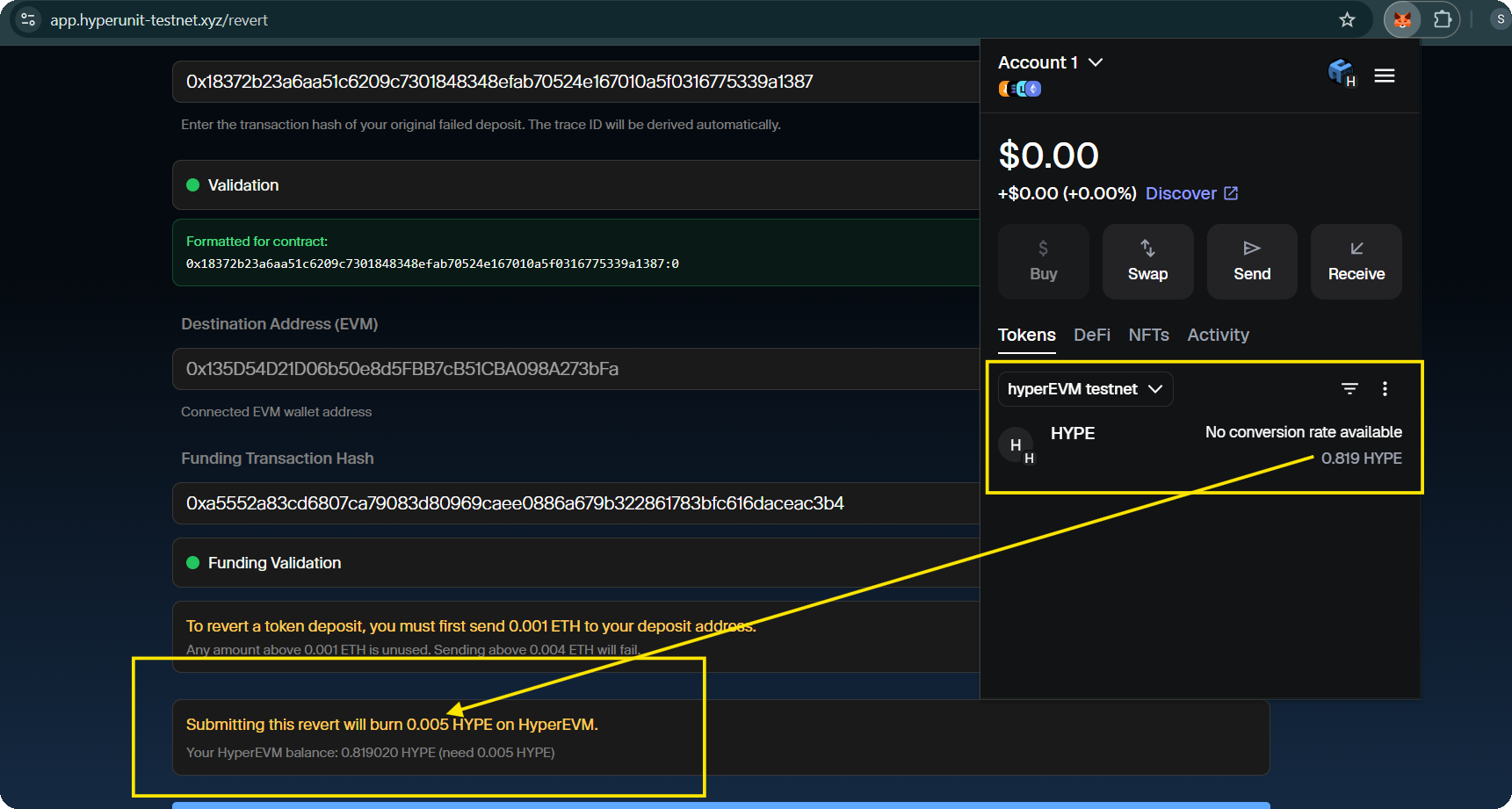
#### Confirm HYPE Fee Availability on HyperEVM
Before submitting, confirm your connected wallet holds sufficient HYPE on HyperEVM. The UI displays the exact amount required and your current balance. Ensure your balance meets or exceeds the stated requirement. This HYPE is burned as part of the revert submission.
{% endstep %}
{% step %}
#### **Submit Revert Request**
Click Submit Revert and sign the transaction in your wallet when prompted.
{% endstep %}
{% step %}
#### Confirm Submission Success and Verify Return of Funds
After signing, the UI displays a confirmation that your revert request was submitted successfully, along with a transaction hash.
After processing and required confirmations, verify the reverted asset balance in your wallet on the source chain.
{% endstep %}
{% endstepper %}
### Common Errors
* **Invalid Hashes**: If you provide an invalid original hash or invalid funding hash, the UI shows validation errors (red indicators) and the request will not proceed. Double-check that you are pasting the correct hashes for the correct transaction type.
* **HYPE Fee**: You must have the requisite HYPE on the HyperEVM in the **deposit address with the original failed transaction, not the destination address**.